Membrane & Tiers
A 4-tier permission system for AI SDK tools. Auto, draft, confirm, block.
When you hire a human employee, you don't give them the keys to everything on day one. They can read documents freely, but sending emails to clients needs a manager's sign-off, and deleting the production database is simply not allowed.
The membrane gives your AI agent the same boundaries. It wraps your tools with a 4-tier permission system, from "run freely" to "never execute, period." The agent can still see all its tools, but the membrane controls which ones actually fire, which ones pause for approval, and which ones are completely off-limits.
Every tool gets exactly one tier, which controls what happens when the agent tries to call it.
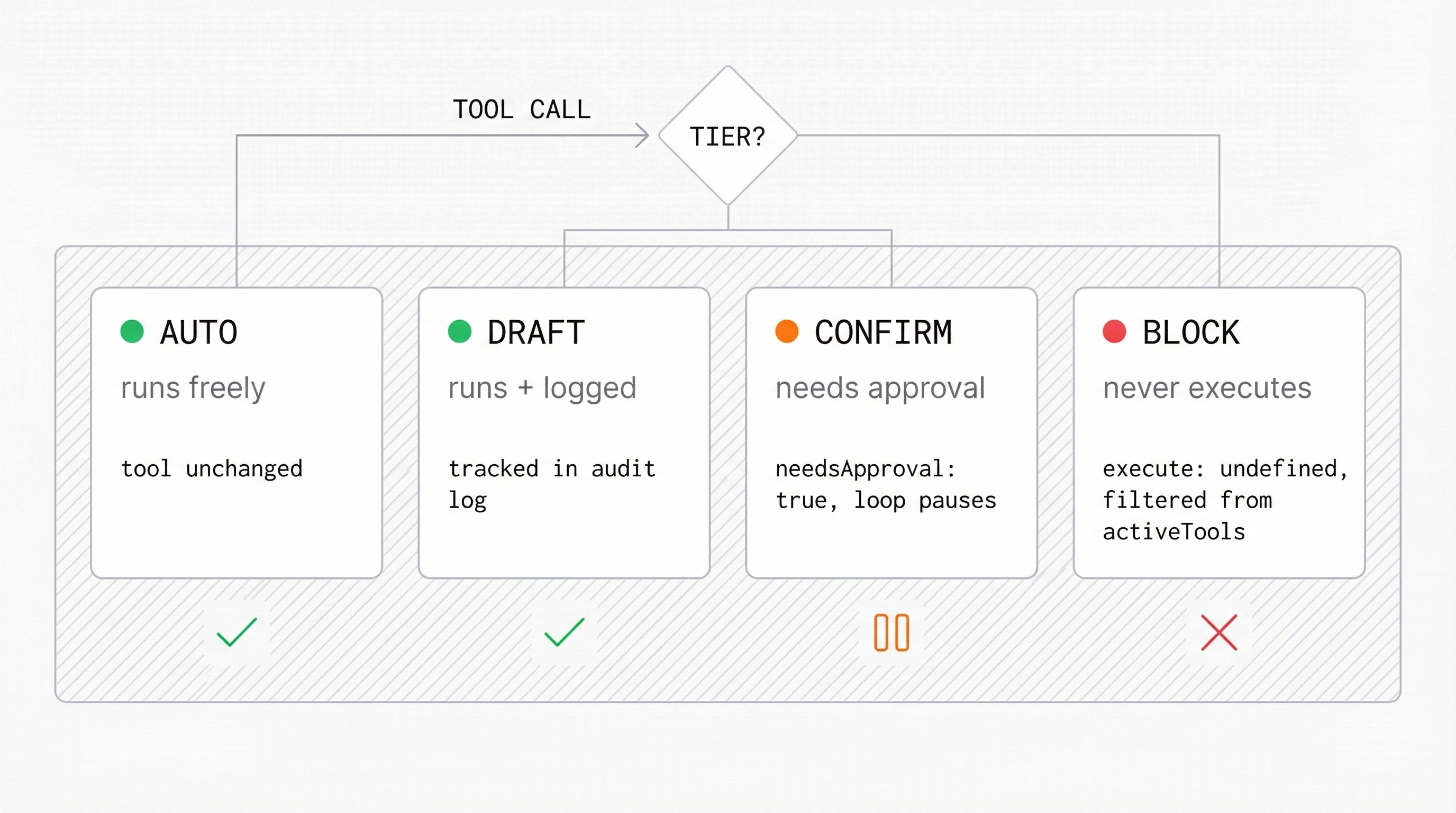
| Tier | Behavior | AI SDK Mechanism |
|---|---|---|
auto | Runs without intervention | Tool unchanged |
draft | Runs, tracked for audit | Logged to audit log |
confirm | Pauses for human approval | needsApproval: true |
block | Never executes | execute: undefined + filtered from activeTools |
Basic Usage
import { membrane } from '@ai-employee-sdk/core';
import { generateText, tool, stepCountIs } from 'ai';
import { openai } from '@ai-sdk/openai';
import { z } from 'zod';

const tools = {
  readFile: tool({
    description: 'Read a file',
    inputSchema: z.object({ path: z.string() }),
    execute: async ({ path }) => `contents of ${path}`,
  }),
  writeFile: tool({
    description: 'Write to a file',
    inputSchema: z.object({ path: z.string(), content: z.string() }),
    execute: async ({ path, content }) => `wrote to ${path}`,
  }),
  deleteFile: tool({
    description: 'Delete a file',
    inputSchema: z.object({ path: z.string() }),
    execute: async ({ path }) => `deleted ${path}`,
  }),
};

const m = membrane({
  tools,
  tiers: {
    auto: ['readFile'],
    confirm: ['writeFile'],
    block: ['deleteFile'],
  },
});

const result = await generateText({
  model: openai('gpt-4o'),
  tools: m.tools,
  prepareStep: m.prepareStep,
  experimental_onToolCallFinish: m.onToolCallFinish,
  stopWhen: stepCountIs(10),
  prompt: 'Read config.json, write a backup, and delete the old one.',
});

// readFile: executed automatically
// writeFile: paused for approval (needsApproval)
// deleteFile: never executed (blocked)
console.log(m.auditLog);
Tier Resolution
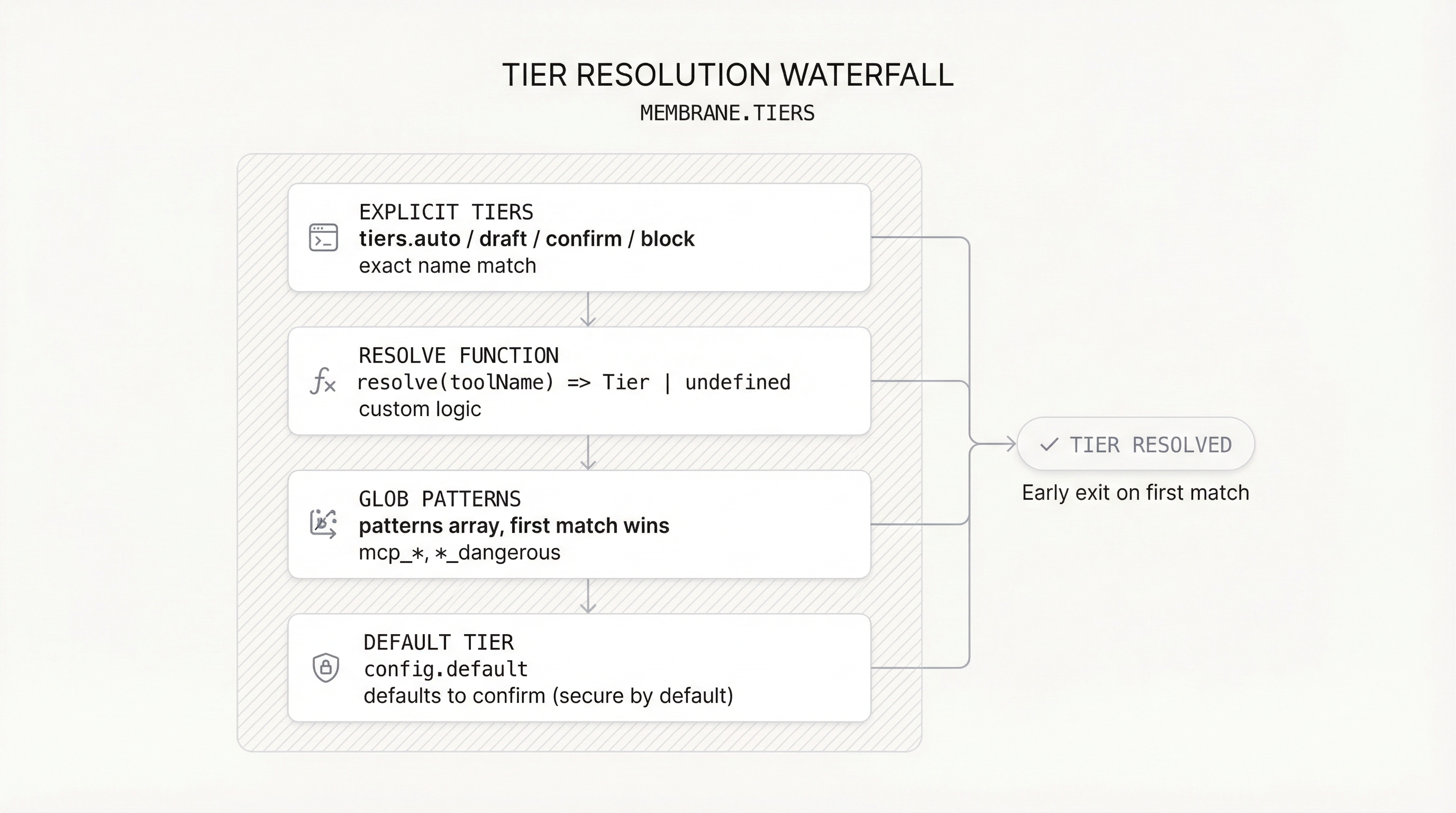
Tools are resolved to tiers in this order:
Explicit Tiers
Tools listed in tiers.auto, tiers.draft, tiers.confirm, or tiers.block.
Custom Resolve Function
A function that receives the tool name and returns a Tier or undefined (to skip).
Glob Patterns
Pattern strings matched in order. First match wins. Supports * wildcards: 'mcp_*', '*_dangerous', '*admin*'.
Default Tier
Falls back to config.default, which defaults to 'confirm' (secure by default).
const m = membrane({
  tools,
  tiers: {
    auto: ['readFile'],
  },
  resolve: (name) => {
    if (name.startsWith('safe_')) return 'auto';
    return undefined; // fall through to patterns
  },
  patterns: [
    { match: 'mcp_*', tier: 'confirm', description: 'All MCP tools need approval' },
    { match: '*_dangerous', tier: 'block', description: 'Block dangerous tools' },
  ],
  default: 'draft', // everything else is draft (default would be 'confirm')
});
Debugging Tier Resolution
Use explainTier to understand why a tool got a specific tier.
import { explainTier } from '@ai-employee-sdk/core';

const resolution = explainTier('mcp_slack_post', {
  tools: {},
  patterns: [
    { match: 'mcp_*', tier: 'confirm', description: 'MCP tools need approval' },
  ],
});

console.log(resolution);
// {
//   tier: 'confirm',
//   source: 'pattern',
//   description: 'MCP tools need approval',
//   patternIndex: 0,
// }
The source field tells you which resolution step matched:
'explicit': found intiers.auto/draft/confirm/block'resolve': returned by theresolve()function'pattern': matched a glob pattern (includespatternIndex)'default': no rule matched, used the default tier
Audit Log
The membrane logs every tool call to m.auditLog (max 1,000 entries, oldest shifted out on overflow).
const m = membrane({ tools, tiers: { auto: ['readFile'] } });

// ... run the agent ...

for (const entry of m.auditLog) {
  console.log(entry);
  // {
  //   timestamp: 1711234567890,
  //   toolName: 'readFile',
  //   input: { path: 'config.json' },
  //   output: 'contents of config.json',
  //   tier: 'auto',
  //   blocked: undefined,
  //   stepNumber: 0,
  // }
}
Blocked tools still appear in the audit log with blocked: true and output: undefined.
How It Works
Under the hood, membrane() does three things:
- Wraps tools.
blocktools getexecute: undefined.confirmtools getneedsApproval: true.draftandautotools are passed through. - Returns
prepareStep. Filtersblocktools fromactiveTools(belt and suspenders with theexecute: undefinedapproach) and injects__membranecontext intoexperimental_context. - Returns
onToolCallFinish. Logs all tool executions to the audit log array.
With EmployeeAgent
When using EmployeeAgent, pass membrane config without tools (tools are passed separately):
import { EmployeeAgent } from '@ai-employee-sdk/core';

const agent = new EmployeeAgent({
  model: openai('gpt-4o'),
  tools: { readFile, writeFile, deleteFile },
  membrane: {
    tiers: {
      auto: ['readFile'],
      confirm: ['writeFile'],
      block: ['deleteFile'],
    },
  },
});

// Access audit log after execution
console.log(agent.auditLog);
The membrane config in EmployeeAgent uses Omit<MembraneConfig, 'tools'>. Tools are passed via config.tools and wired automatically.
Reference
membrane(config)
| Parameter | Type | Description |
|---|---|---|
config.tools | TOOLS | The tools to wrap |
config.tiers | { auto?, draft?, confirm?, block? } | Explicit tool-to-tier mapping (string arrays) |
config.resolve | (toolName: string) => Tier | undefined | Custom resolver function |
config.patterns | TierPattern[] | Glob patterns, matched in order |
config.default | Tier | Default tier. Default: 'confirm' |
Returns: MembraneResult<TOOLS>
| Property | Type | Description |
|---|---|---|
tools | TOOLS | Wrapped tools with tier permissions applied |
prepareStep | PrepareStepFunction | Filters blocked tools, injects membrane context |
onToolCallFinish | (event) => void | Logs tool calls to audit log |
auditLog | AuditEntry[] | All logged tool executions (max 1,000) |
resolveTier(toolName, config)
Returns just the Tier for a tool name.
explainTier(toolName, config)
Returns TierResolution with tier, source, optional description, and optional patternIndex.