Interrupts
Pause agent execution for human approval, serialize state, resume with decisions.
Your agent runs at 3 AM on a cron job. It finishes its analysis and wants to send an email to a client. Nobody's awake to approve it.
The agent pauses, serializes its entire state to a database, and dies. Zero compute cost while it waits. Six hours later, you check Slack, see "Agent wants to send this email," click Approve, and the agent resumes exactly where it left off, with your approved (or edited) arguments.
No WebSocket connections held open. No long-running processes. The agent's state lives in KV/DB, not in memory.
When an agent hits a confirm-tier tool (or any tool with needsApproval: true), the AI SDK stops the agent loop. 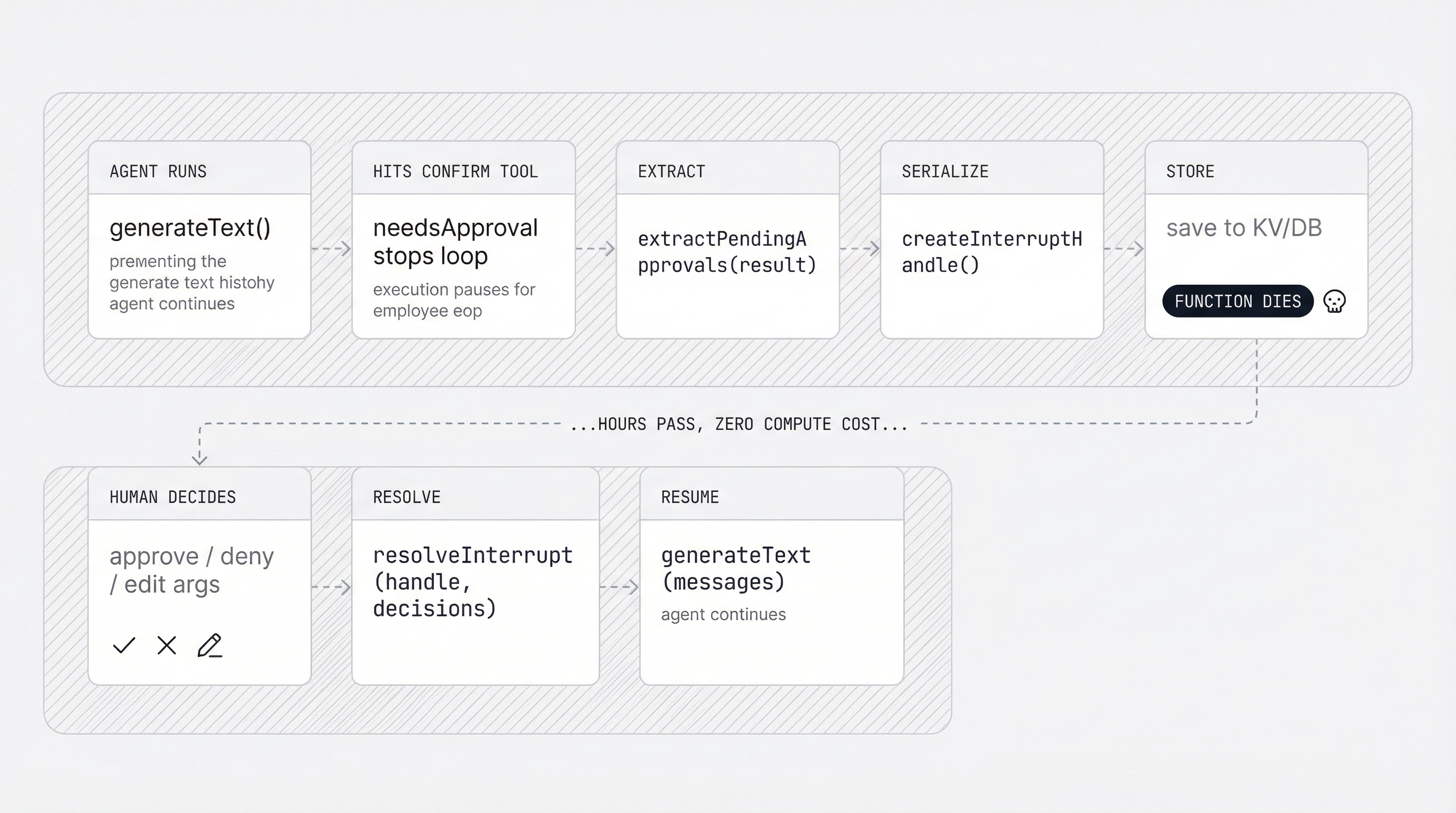
This package provides three pure functions to handle that flow:
extractPendingApprovals: find which tool calls are waiting for approval.createInterruptHandle: serialize the full state to plain JSON.resolveInterrupt: apply human decisions and produce messages for resumption.
Basic Usage
import { generateText, tool, stepCountIs } from 'ai';
import { openai } from '@ai-sdk/openai';
import {
  membrane,
  extractPendingApprovals,
  createInterruptHandle,
  resolveInterrupt,
} from '@ai-employee-sdk/core';
import { z } from 'zod';

const tools = {
  sendEmail: tool({
    description: 'Send an email',
    inputSchema: z.object({
      to: z.string(),
      subject: z.string(),
      body: z.string(),
    }),
    execute: async ({ to, subject }) => `Email sent to ${to}: ${subject}`,
  }),
};

const m = membrane({
  tools,
  tiers: { confirm: ['sendEmail'] },
});

// Step 1: Agent runs and hits a confirm tool
const result = await generateText({
  model: openai('gpt-4o'),
  tools: m.tools,
  prepareStep: m.prepareStep,
  stopWhen: stepCountIs(10),
  prompt: 'Send an email to alice@example.com about the meeting.',
});

// Step 2: Extract pending approvals
const pending = extractPendingApprovals(result);

if (pending.length > 0) {
  // Step 3: Create serializable handle (include original prompt for context on resume)
  const handle = createInterruptHandle(result, pending, {
    originalMessages: [{ role: 'user', content: 'Send an email to alice@example.com about the meeting.' }],
  });
  // handle.id = UUID, safe for KV/DB key
  // handle is plain JSON, no classes, no functions

  // Step 4: Show to human, get decisions
  console.log('Pending approvals:');
  for (const p of pending) {
    console.log(`  ${p.toolName}(${JSON.stringify(p.args)})`);
  }

  // Step 5: Resolve with decisions
  const { messages, previousUsage } = resolveInterrupt(handle, [
    { toolCallId: pending[0].toolCallId, action: 'approve' },
  ]);

  // Step 6: Execute approved tools and inject real results
  const lastMsg = messages[messages.length - 1];
  if (lastMsg?.role === 'tool') {
    for (const part of lastMsg.content) {
      if (part.output?.type === 'execution-denied') continue;
      const approval = pending.find((p) => p.toolCallId === part.toolCallId);
      if (approval) {
        const result = await tools.sendEmail.execute(approval.args as any, {} as any);
        part.output = { type: 'text', value: typeof result === 'string' ? result : JSON.stringify(result) };
      }
    }
  }

  // Step 7: Resume the agent with real tool output
  const resumed = await generateText({
    model: openai('gpt-4o'),
    tools: m.tools,
    prepareStep: m.prepareStep,
    messages,
    stopWhen: stepCountIs(10),
  });

  console.log(resumed.text);
}
resolveInterrupt is a pure function. It produces placeholder tool results, not real execution output. You are responsible for executing approved tools and replacing the placeholders with real results before resuming. Without this step, the agent sees a placeholder like [APPROVED] but the tool never actually ran, causing it to retry the tool call in a loop.
See the slack-coworker example for a complete implementation of this pattern.
Editing Arguments
Approve with modified arguments:
const { messages } = resolveInterrupt(handle, [
  {
    toolCallId: pending[0].toolCallId,
    action: 'approve',
    editedArgs: {
      to: 'alice@example.com',
      subject: 'Updated: Meeting Tomorrow',
      body: 'The meeting has been moved to 3pm.',
    },
  },
]);
The tool result message includes [APPROVED] Args edited to: {...} so the agent knows the arguments were modified.
Denying Tool Calls
const { messages } = resolveInterrupt(handle, [
  { toolCallId: pending[0].toolCallId, action: 'deny' },
]);
The tool result uses the execution-denied output type, giving the agent a structured signal that the tool was blocked. The agent receives this as context and can adjust its behavior.
Missing decisions are treated as deny. If you only provide decisions for some pending approvals, the rest are automatically denied.
Budget Continuity
The handle captures cumulative token usage via previousUsage. When resuming, pass it through to maintain accurate cost tracking across interrupt cycles:
const { messages, previousUsage } = resolveInterrupt(handle, decisions);

// previousUsage: { inputTokens, outputTokens, totalTokens }
// Use this to track total cost across interrupt/resume cycles
Serialization
InterruptHandle is plain JSON. No classes, no functions, no circular references.
// Store in any KV/DB
const json = JSON.stringify(handle);
await kv.set(`interrupt:${handle.id}`, json);

// Retrieve later
const stored = JSON.parse(await kv.get(`interrupt:${handle.id}`));
const { messages } = resolveInterrupt(stored, decisions);
The handle contains:
id: UUID for key constructioncreatedAt: ISO timestampmessages: deep copy of the full message historypendingApprovals: the tool calls awaiting decisionsinterruptedStepToolCalls: all tool calls from the interrupted steppreviousUsage: cumulative token usage up to the interruption point
Reference
extractPendingApprovals(result)
Finds tool calls in the generateText result that have no matching toolResult.
Returns: PendingApproval[]
| Property | Type | Description |
|---|---|---|
toolCallId | string | Unique ID of the tool call |
toolName | string | Name of the tool |
args | unknown | Arguments proposed by the LLM |
stepNumber | number | Which step the call occurred in |
createInterruptHandle(result, pendingApprovals, options?)
Creates a serializable JSON handle from a generateText result.
| Parameter | Type | Description |
|---|---|---|
result | any | The generateText result |
pendingApprovals | PendingApproval[] | From extractPendingApprovals |
options.originalMessages | any[]? | Original input messages to include in the handle. Recommended so the handle is self-contained for resume. |
Returns: InterruptHandle
resolveInterrupt(handle, decisions)
Pure function. No side effects. Applies human decisions to the interrupt handle.
| Parameter | Type | Description |
|---|---|---|
handle | InterruptHandle | The serialized interrupt state |
decisions | InterruptDecision[] | Human decisions for each pending approval |
Returns: { messages: any[], previousUsage: { inputTokens, outputTokens, totalTokens } }
Each InterruptDecision:
| Property | Type | Description |
|---|---|---|
toolCallId | string | Which pending approval this decides |
action | 'approve' | 'deny' | The decision |
editedArgs | unknown? | Modified arguments (only for approve) |